Whether you are looking for the PSER App & Form Download, the official registration form in PDF format, or a step-by-step guide to registering through your mobile phone — this page covers everything.
The Punjab government has made PSER registration accessible through multiple channels so that every deserving household can register regardless of their technical skills or internet access. Here is exactly what is available, what is official, and what to watch out for.
PSER App & Form Download — Is There an Official App?
This is one of the most-searched questions about PSER — and the answer requires some clarification.
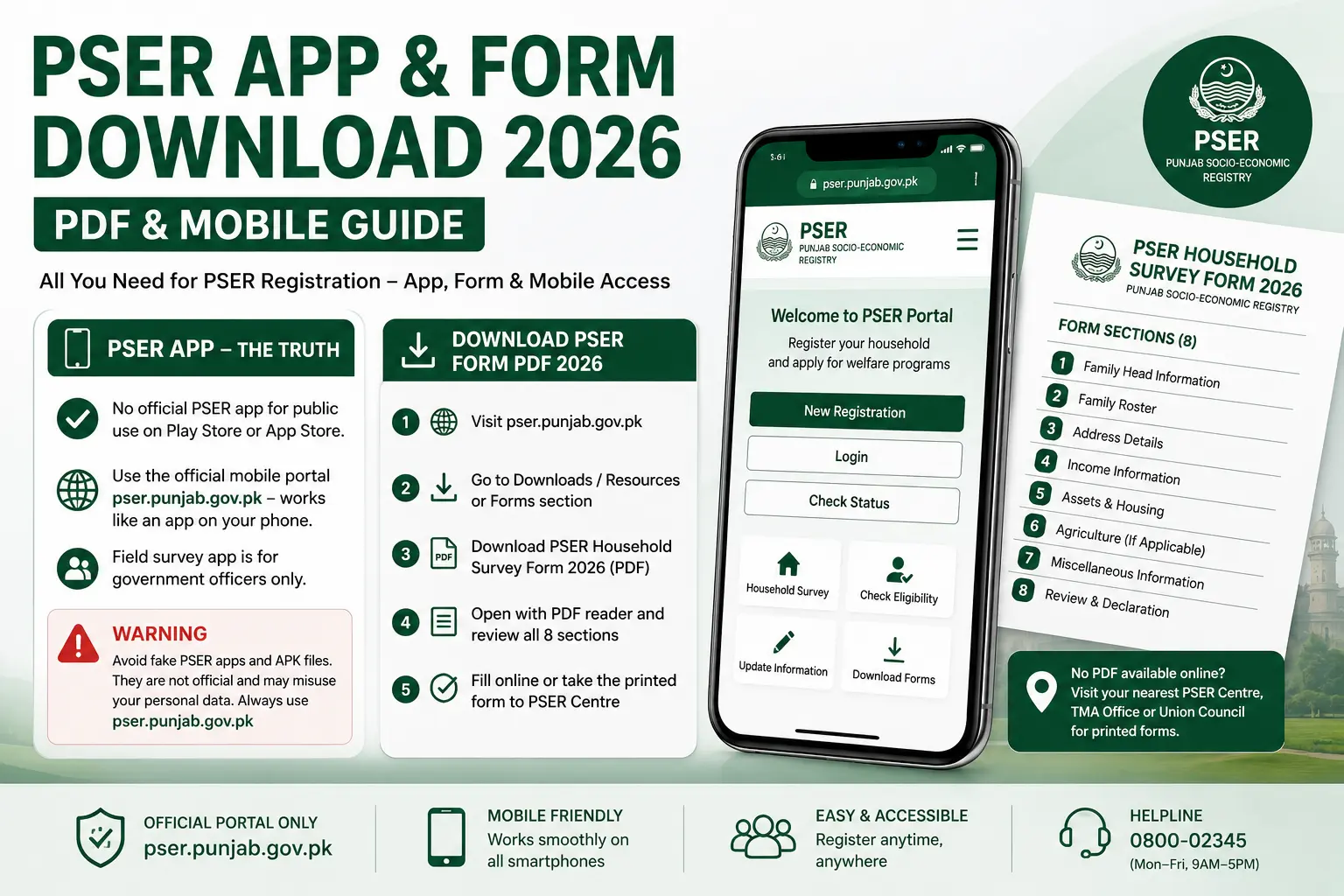
There is no standalone PSER registration app available on the Google Play Store or Apple App Store for general public use at this time. The Punjab government has not released a dedicated downloadable app for household PSER registration that the public can search for and install independently.
What does exist is:
- The official mobile-optimised web portal at pser.punjab.gov.pk — this works exactly like an app on your smartphone browser and covers all registration, login, status check, and survey submission functions
- A field survey app used exclusively by PSER government survey officers during door-to-door visits — this is an internal government tool not available to the public
- Third-party apps on the Play Store claiming to be the “PSER App 2026” — these are unofficial, unverified, and potentially dangerous. Do not download them.
Warning: Several fake PSER apps have appeared on the Google Play Store and various APK download websites. These apps are not created by the Punjab government and may collect your personal CNIC and household data without authorisation. Always use pser.punjab.gov.pk directly through your browser — it is the only safe and official registration platform.
The mobile web portal at pser.punjab.gov.pk runs so smoothly on smartphones that a separate app is genuinely unnecessary. It loads quickly, adjusts to your screen size, and supports all functions from registration to document upload.
How to Download PSER Registration Form PDF 2026
The PSER registration form PDF is useful for households that want to review all the questions before sitting down to fill out the online form, or for people who need to complete registration at a PSER centre with staff assistance.
To access the PSER form PDF:
- Go to pser.punjab.gov.pk on your browser
- Look for a Downloads, Resources, or Forms section on the portal homepage or footer
- Download the official PSER Household Survey Form 2026 in PDF format
- Open it with any PDF reader — Adobe Acrobat, WPS Office, or your phone’s default PDF viewer
If a downloadable PDF is not currently available on the portal:
- Visit your nearest PSER Registration Centre — printed forms are available at all centres across Punjab
- Call the helpline 0800-02345 and request information about where to obtain the printed form in your district
- Your local Tehsil Municipal Administration (TMA) office or Union Council office may also have printed PSER forms available
What the PSER form covers:
The form has 8 sections matching the online survey — family head information, family roster, address, income, assets and housing, agriculture (if applicable), miscellaneous information, and review. Filling it out in advance helps you prepare accurate answers before submitting online or at a centre.
How to Register via PSER App (Step by Step)
Since there is no standalone public app, registering via mobile means using the official PSER web portal through your smartphone browser. Here is the complete step-by-step process — it works identically to the desktop experience:
Download for Android
Android users do not need to download anything from the Play Store. Here is how to set up quick mobile access:
- Open Google Chrome or any browser on your Android phone
- Go to pser.punjab.gov.pk
- Tap the three dots menu (top right corner in Chrome)
- Select “Add to Home Screen”
- Name it “PSER Portal” and tap Add
This creates a shortcut icon on your home screen that opens the portal instantly — just like a real app. You can now tap it anytime to log in, check status, or continue your registration.
For registration itself, follow these steps on your Android browser:
- Open the portal and tap New Registration
- Enter your 13-digit CNIC and Nadra-verified mobile number
- Verify the OTP sent to your phone
- Fill all 8 sections of the household survey form
- Upload your CNIC photo and documents directly from your phone’s camera or gallery
- Submit and save your registration reference number
Download for iOS / iPhone
iPhone users follow the same process using Safari — Apple’s default browser:
- Open Safari on your iPhone
- Go to pser.punjab.gov.pk
- Tap the Share button (the box with an arrow pointing up, at the bottom of the screen)
- Scroll down and tap “Add to Home Screen”
- Name it “PSER Portal” and tap Add
The portal icon will appear on your iPhone home screen for instant access. The registration process on iPhone Safari is identical to Android — all 8 survey sections, document upload, and submission work fully on iOS.
Tip for both Android and iOS: Complete your PSER registration over Wi-Fi rather than mobile data if possible. The document upload step — uploading CNIC photos — can consume data and may time out on a weak mobile data connection.
PSER QR Code Scanner — How to Use It for Registration
The Punjab government has deployed official PSER QR codes at registration centres, government notice boards, district offices, and some door-to-door survey points across Punjab. Scanning the QR code is the easiest way to open the official PSER portal without typing the URL — eliminating the risk of mistyping the address and landing on an unofficial site.
How to scan the PSER QR code:
- Open your smartphone’s camera app — on most modern Android phones and all iPhones, the built-in camera can scan QR codes automatically
- Point the camera at the official PSER QR code displayed on the notice board or government document
- A notification or banner will appear at the top of your screen — tap it
- You will be redirected directly to pser.punjab.gov.pk
- Proceed with registration or log in as normal
If your camera does not scan QR codes automatically:
Download any trusted QR code scanner app from the Play Store or App Store — search for “QR Code Reader” and choose one with a high number of downloads and reviews. Scan the PSER QR code with it and tap the link that appears.
Important: Only scan QR codes displayed on official government materials — notices from the Punjab government, PSER Registration Centre boards, or materials distributed by verified PSER field survey teams. Do not scan QR codes shared via WhatsApp or social media claiming to be PSER links — these can redirect to fake portals.
PSER Online Survey Registration via App 2026
The PSER online survey registration process through mobile follows the same structure as the desktop version — the same 8-section household survey, the same document upload requirement, and the same submission process. Here is what makes mobile survey submission slightly different and how to handle it:
Taking CNIC photos on mobile:
Instead of scanning documents separately, mobile users can take photos directly with their phone camera during the upload step. Make sure:
- Photos are taken in good natural lighting — avoid shadows across the CNIC
- The entire CNIC is visible in the frame — do not crop any edge
- The text on the CNIC is sharp and readable — zoom in after taking the photo to verify before uploading
- File size is under 2MB — if your photo is too large, use any free image compression website before uploading
Saving your progress:
The PSER portal may or may not auto-save your progress between sections depending on the portal version active in your area. To avoid losing data:
- Complete the entire survey in one uninterrupted session if possible
- Do not switch apps or let your phone screen lock during the process
- If you must pause, stay on the same browser tab — do not close it
After submission on mobile:
You will receive a registration reference number on screen and via SMS. Screenshot the confirmation page immediately in addition to saving the SMS — screenshots are easier to find later.
Offline Registration Form — For Areas Without Internet
Not every household in Punjab has reliable internet access — and the PSER system is designed to accommodate this. If you or someone in your family cannot complete the online registration, here are all the offline options available:
Option 1 — Visit a PSER Registration Centre
There are over 5,000 PSER Registration Centres across Punjab — in district headquarters, tehsil offices, and union council offices. At these centres, trained PSER staff will:
- Help you fill out the registration form on the official portal on your behalf
- Scan and upload your documents
- Submit your application, and provide you with your registration reference number
- Answer any questions about eligibility or the survey process
This service is completely free of charge. Call 0800-02345 to find your nearest registration centre.
Option 2 — Wait for the Door-to-Door Survey Team
PSER field survey teams are currently active across all 36 districts of Punjab. These teams visit homes directly and complete your household registration on their official survey tablets. If a team has not yet visited your area, you can:
- Contact your local union council office to inquire about the survey schedule for your area
- Call 0800-02345 to report that your household has not yet been surveyed and request a visit
Option 3 — Tehsil Office Assistance
Your local Tehsil Municipal Administration (TMA) office can direct you to the nearest PSER registration facility and, in some cases, assist directly. Bring your original CNIC and CNICs or B-Forms of all family members when visiting any office for registration assistance.
What to bring for offline registration:
- Original CNIC of the family head (plus photocopies)
- CNICs or B-Forms of all household members
- A recent passport-size photograph of the family head
- Proof of residence — utility bill or tenancy letter
- Your mobile number that is Nadra-biometric verified
Frequently Asked Questions — PSER App & Form
Is the PSER app free to download?
There is no official standalone PSER app available for public download — so there is nothing to pay for. The Punjab government has not released a dedicated PSER registration app on the Google Play Store or Apple App Store. Any app you find claiming to be the “PSER App 2026” is unofficial and should not be downloaded.
Can I submit the PSER form offline at a tehsil office?
Yes. If you cannot complete the PSER registration online, you can visit your nearest PSER Registration Centre — many of which are located at or near tehsil offices across Punjab. Trained PSER staff at these centres will complete the online registration on your behalf using the official portal.
What is the PSER registration form 2026 download link?
The official PSER registration form 2026 is available through the Punjab government’s PSER portal at pser.punjab.gov.pk. Look for a Downloads or Resources section on the portal. If a standalone PDF download link is not currently visible on the homepage, visit the portal and navigate through the menu — the form is typically accessible from the registration or resources section.
Conclusion
Finding the right PSER App & Form Download option comes down to one simple principle — use official sources only. The official mobile portal at pser.punjab.gov.pk gives you everything a dedicated app would offer, without the risk of downloading something unofficial. The PDF form is available at the portal or at any PSER Registration Centre across Punjab. And if internet access is a genuine barrier, the offline options — registration centres, door-to-door survey teams, and tehsil office assistance — ensure that no deserving household is left out simply because of limited digital access.
The most important step is to complete your registration now — regardless of which method you use. Every welfare programme the Punjab government announces draws its beneficiary list from the PSER database. Without your household in that database, no amount of eligibility will guarantee you the support you deserve. Register today at pser.punjab.gov.pk or call 0800-02345 for free assistance.